
GoLauncher Vending Machine1.8 - Get APK
You'll be able to download in few seconds.
Publisher Description
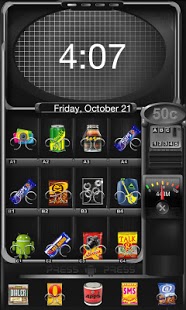
* It includes over 50 customised app icons - and counting (to replace icons - long press any icon - replace - themes icon - choose your icon)
* 2 choices of wallpaper - 4x4 home icon grid and a 5x5 home icon grid. (Menu - Wallpaper - Go Wallpaper)
Change your icon grid accordingly as descriibed further on.
* Space for widgets without breaking the theme
There are a few things you must do to make it look like the screenshots. Don't worry, it won't take too long to set up and will be well worth it. They are...
* Set your home screen to the 5x5 icon grid setup. (Menu - Preferences - Screen Settings - Grid Size - 5X5 or 4x4)Depending which wallpaper you have chosen.
* Also- In Preferences - Screen Settings - Wallpaper Mode - select "vertical screen mode") this will stop the wallpaper sliding around so your snacks fit in perfectly
* Lastly, You should set your app drawer to 5X5 icon grid for the best results. (Menu - Preferences - App Drawer Settings - Grid Size)
If you like this theme, you should get a load of my others also available in the market - just search for mindseed.
That's it... I hope you enjoy using it - drop me a line if there is anything you have problems with, I reply to all my emails as instantly as possible.
Please rate this theme if you like it. Send me suggestions, I appreciate any input.
Oh yeah! The widgets in the screenshots are:
* "Digital Clock Widget" by Maize, free in the market (fits in real nice with the vending machine - resize the widget to suit you.
* The fantastic GoDevTeam created the Taskmanager 1x1 Widget
* Both available for free on the market
and just to re-iterate...
To Install this Theme YOU MUST have the excellent GoLauncher Ex home replacement application which can be found in the Google Android Market.
**TIP**
For a full screen no status bar home screen (or GOLocker screen) to give the theme maximum real estate - from home screen - Press Menu - Preferences - Screen Settings - Untick "Status Bar" - then to make it appear with swipes whenever you need it -
From Home screen - Menu - Preferences - Gesture Settings - You can set the up and down swipe to "Enable/ Disable Status Bar" - unless you use this feature for other purposes of course. This also works in hiding the status bar with GOLocker.
Contact Me using any of the below means. I'd be happy to hear from you. I can't reply to comments in the market.
Follow: https://twitter.com/@mindseedDesign
Like: http://www.facebook.com/mindseed.design
Plus: https://plus.google.com/109275982008448960608/posts
Visit: http://www.mindseed.co.za
Email: mindseed.design@gmail.com
About GoLauncher Vending Machine
The company that develops GoLauncher Vending Machine is mindseed design. The latest version released by its developer is 1.8.
To install GoLauncher Vending Machine on your Android device, just click the green Continue To App button above to start the installation process. The app is listed on our website since 2011-11-15 and was downloaded 0 times. We have already checked if the download link is safe, however for your own protection we recommend that you scan the downloaded app with your antivirus. Your antivirus may detect the GoLauncher Vending Machine as malware as malware if the download link to com.gau.go.launcherex.theme.vendingmachine is broken.
How to install GoLauncher Vending Machine on your Android device:
- Click on the Continue To App button on our website. This will redirect you to Google Play.
- Once the GoLauncher Vending Machine is shown in the Google Play listing of your Android device, you can start its download and installation. Tap on the Install button located below the search bar and to the right of the app icon.
- A pop-up window with the permissions required by GoLauncher Vending Machine will be shown. Click on Accept to continue the process.
- GoLauncher Vending Machine will be downloaded onto your device, displaying a progress. Once the download completes, the installation will start and you'll get a notification after the installation is finished.
Program Details
System requirements
Download information
Pricing
Version History
version 1.8
posted on 2011-11-15
V1.8 More Icons added, theme additions,V1.7 Image Optimisation,V1.6 Initial Release
version 1.8
posted on 2011-11-15
Several fixes and updates
Disclaimer
External Download
We do not host GoLauncher Vending Machine on our servers. We did not scan it for viruses, adware, spyware or other type of malware. This app is hosted by Galad and passed their terms and conditions to be listed there. We recommend caution when installing it.
The APK Download link for GoLauncher Vending Machine is provided to you by apps112.com without any warranties, representations or guarantees of any kind, so access it at your own risk.
If you have questions regarding this particular app contact the publisher directly. For questions about the functionalities of apps112.com contact us.
